Finish required eBay seller setup
- 1
Connect eBay
ProfileSellingConnect eBayLink the seller account and grant the seller scopes Wax Cache needs for listing setup and publishing.
- 2
Enable business policies
eBay Seller HubBusiness policieseBay uses policies to define payment, shipping/fulfillment, and returns. Wax Cache needs those policies ready before publishing.
- 3
Create payment, shipping, and return policies
Payment policyShipping policyReturn policyConfirm how buyers pay, how orders ship, who handles returns, and what return window applies.
- 4
Confirm inventory location
Inventory locationIf setup says inventory location is missing, finish the ship-from location in eBay Seller Hub.
- 5
Verify readiness
ProfileSellingeBay listing setupReturn to Wax Cache and confirm listing setup says Ready before starting listing work.
List one card from Wax Cache
- 1
Clean the card record
CollectionCard detailsVerify photos, title, year, set, player or character, card number, variant, condition, value, and box.
- 2
Open seller tools
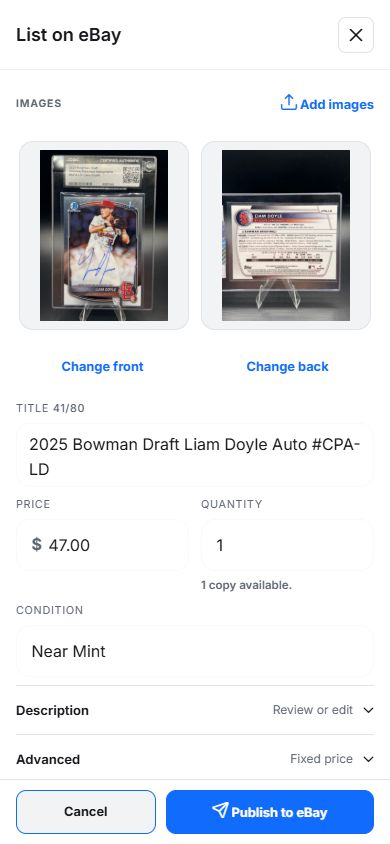
Card detailsList on eBayStart the listing composer from the saved card so listing state remains tied to the record.
- 3
Review generated listing content
List card on eBayWax Cache can seed title, description, price, and images from the card, but seller judgment is still required.
- 4
Select policies and publish only after review
PaymentShippingReturnPublishConfirm policies, category context, price, condition, photos, and duplicate listing warnings before publishing.
Prepare and resume a batch
- 1
Select cards with complete records
CollectionSelection modeChoose at least two cards whose identity, photos, condition, quantity, and storage are ready for listing review.
- 2
Prepare individual drafts
Prepare eBay listingsCreate a batch of separate drafts. Review each title, photo, price, condition, and policy choice rather than treating selection as permission to publish everything.
- 3
Mark reviewed drafts ready
Batch reviewReadyResolve the indicated blockers and mark the drafts you have checked as ready. Publish ready listings with a connected eBay seller account; leave unfinished drafts for later.
- 4
Resume saved work
SellingBatches & draftsReturn to unfinished batches and drafts from Selling. Recheck prices, photos, quantities, and seller setup before publishing saved work.
Understand publish blockers
- Missing selected card image.
- Missing or invalid price.
- Incomplete title, description, sport, TCG game, or category context.
- Missing eBay seller setup, business policy, seller scope, or inventory location.
- Duplicate active listing warning for a card that is already listed.
eBay controls policy readiness. If publishing is blocked by seller setup, fix it in eBay Seller Hub, then refresh Wax Cache seller setup.
Find the card and record the outcome
- Before fulfilling a sale, search the saved card and confirm its current box and location against the physical copy.
- Check the card variant, condition, and quantity against the listing so similar copies are not confused.
- Review listing and sold state in Selling. Record sales made elsewhere through the manual sold workflow; those channels are not automatic listing or payment integrations.
- Treat card estimates, recorded sale prices, and known card costs as different information. Sales totals are before fees and shipping.
Separate Wax Cache allowances from eBay fees
Free includes 5 physical cards newly published to eBay per UTC calendar month; Hobby has no monthly publishing cap. Copies and cards in lots count. For example, publishing a quantity of 3 and then a quantity of 2 uses all 5 Free publications, even if neither listing sells. Automatic renewals and ordinary edits do not count again. eBay fees, account limits, policies, and its own listing allowances apply separately.
You can also list directly on eBay, including with its mobile Scan to list tool. Wax Cache is useful when you want the listing workflow connected to saved inventory, photos, and physical storage.
FAQ
Do I need eBay business policies before listing?
Yes. eBay seller workflows require payment, shipping/fulfillment, return policy, and inventory location readiness where applicable. Wax Cache surfaces setup state, but eBay controls those policy records.
Do fixed-price eBay listings expire after 30 days?
Wax Cache sets fixed-price listings to Good Til Canceled. eBay renews them each calendar month until the quantity sells out or you end the listing, subject to its seller limits and policies. Wax Cache syncs listing state; it does not need to republish a fixed-price listing every month. eBay renewal fees and its own allowances are separate.
What does Free include for eBay selling?
Free includes up to 5 physical cards newly published to eBay per UTC calendar month. A successful publication counts whether the card sells or not. Selling or ending a listing does not refund the allowance, and publishing it again counts as a new publication. Added copies and cards in lots count. Automatic eBay renewals and ordinary edits do not count again.
Can I prepare a batch on Free?
Yes. Free and Hobby include batch drafts and review with a connected eBay seller account. Free publishing counts the physical cards in quantities and lots toward the 5-card monthly allowance. Preparing a draft is different from successfully publishing a card.
Can Wax Cache track sold cards?
Wax Cache stores listing and sold context on card records where seller workflows are connected, helping distinguish active inventory from sold-card reporting.